

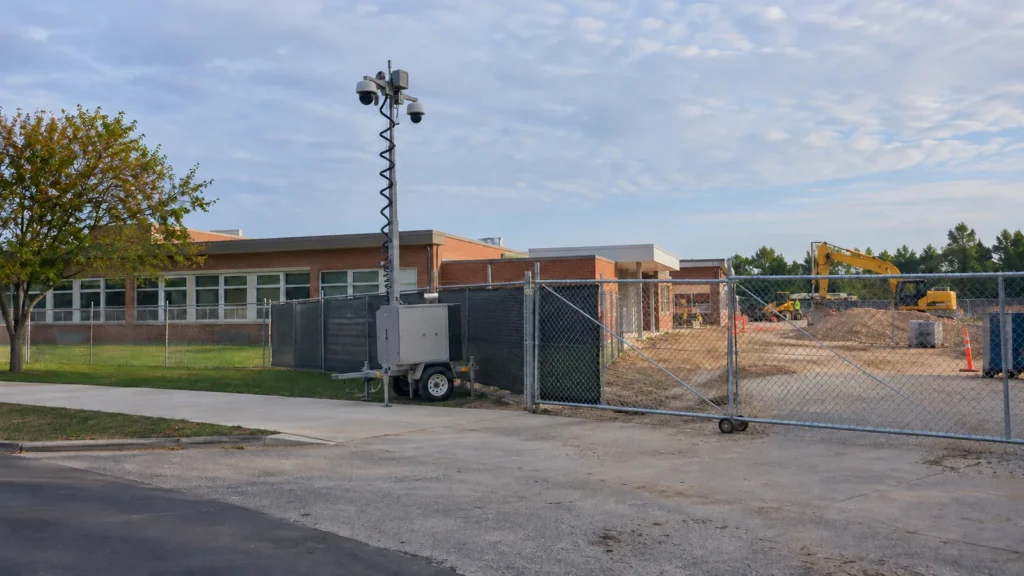
Why an occupied campus changes jobsite security
An occupied campus needs two coordinated boundaries: the school’s perimeter and the construction zone within it. Plan separately for authorized school activity and authorized work, then identify where their routes meet. The jobsite also needs a closing routine that works when classes end but campus activities or contractor work continue.
Start with one drawing that shows the work fence, occupied buildings, contractor parking, delivery approach and school circulation. Ask the district to confirm the routes people actually use, including accessible routes and approved emergency exits. A convenient contractor shortcut should not quietly become a route through an occupied building.
Build the daily handoff around the campus schedule. After-school programs, sports and evening meetings can continue after the crew leaves. Define when construction access ends, who checks the boundary and how a late delivery gets approval. Do not interpret activity elsewhere on campus as permission to enter the jobsite.
For a working document, adapt our construction site security plan template. Record specific responsibilities and review dates instead of relying on a general instruction to keep the site secure.
Using CISA's layered model for a construction boundary
CISA’s school-security model connects detection, delay and response across several campus layers. Applying that model to renovation work means checking how the jobsite boundary, occupied buildings and response arrangements interact. The construction recommendations here are our application of the model, not construction-phase instructions issued by CISA.
The CISA K-12 School Security Guide, third edition, identifies four layers: grounds perimeter, school grounds, building perimeter and building interior. A renovation boundary can sit within those layers; it does not replace them.
- Detect: Define the construction gate or asset area where an unexpected event should be noticed, and how an alert reaches the assigned contact.
- Delay: Use the approved fence, gates and storage controls to restrict unauthorized jobsite access. Keep required exit routes usable.
- Respond: Assign an escalation path and an authorized responder. Camera coverage needs a procedure for what happens after an alert.
A zone plan for school construction
When a school stays open during construction, the jobsite needs its own boundary inside the campus perimeter, so the work area can be watched and locked down after hours without treating students and staff as the thing being monitored. Plan each zone separately.
Use this table as a discussion sheet during the site walk. Mark the actual boundaries and assign an owner to each measure. These are planning recommendations to adapt to the project, not universal specifications.
| Zone | The risk | Boundary measure | Where a camera trailer fits |
|---|---|---|---|
| Laydown and material storage | Materials or tools accessible beyond the work area | Place storage within the controlled zone; secure containers and assign closing checks | A view of storage access and selected assets inside the fence |
| Contractor entry and parking | Unclear authorization or routes shared with school users | Designate entry, parking and sign-in; separate school circulation | Coverage of the contractor gate, excluding student routes |
| Fenced work area next to occupied buildings | Unplanned movement between work and occupied space | Maintain the agreed separation; review doors, temporary openings and approved exits | A view along the jobsite side of the boundary, away from classroom windows |
| After-hours site | Open gates, unauthorized entry or unclear alert handling | Document lockup, approved late work and the contact chain | Agreed jobsite alert zones linked to the response procedure |
| Deliveries | Vehicles or unloading activity conflicting with campus movement | Agree on delivery windows, approach routes and a receiving contact | A supplemental view of the construction delivery entrance, not traffic supervision |
Source: Hawk Surveillance site practice, organized with CISA’s K-12 layered model.
Recheck the table when fencing moves, materials change location or a new phase opens. A plan for yesterday’s gate should not remain the instruction for today’s crew.
Cameras near students: what to point where
Point jobsite cameras at construction gates, material storage and the fenced work area, never into classrooms or play areas. Have the district approve the actual views before use. Keep students and staff outside the surveillance objective, and review placement whenever a changing work boundary brings cameras closer to occupied spaces.
Walk the proposed view from the trailer location before installation. If a useful view of a gate also sweeps across a student route, change the position or narrow the view. Check moving-camera presets as well as the initial position. Where privacy masking is proposed, verify its behavior in both live and recorded views.
Agree with the district on who may access recordings, the approved retention period and how footage requests are handled. Do not enable audio recording by default. Our overview of California rules on surveillance trailers provides background; district policy and a project-specific legal review should guide deployment.
Keep construction footage out of promotional material and routine public updates. A jobsite camera is not an invitation to observe students or evaluate their behavior.
Contractor access and after-hours response
Control contractor access with an approved entrance, a current authorization list, clear identification and accountable key handling. Pair that daytime process with an after-hours contact chain. Decide who approves late work, who receives alerts and who can respond, so a camera event does not become an unanswered notification.
Before mobilization, settle sign-in, badges, permitted routes and key return with the district. California Education Code section 45125.1 addresses criminal-record requirements for contractor employees who interact with pupils. Its applicability and exceptions need district review; a badge or fence is not a substitute for that determination.
For a site monitored through our monitoring partner, agree on the monitored jobsite zones, operating hours and escalation instructions. Record the contractor lead, district contact and backup contact, with a procedure for emergencies. Do not assume an alert includes an on-site security response or a particular emergency-service arrival time.
- Before closing, check the agreed gates, fence condition, storage and approved exit routes.
- Pass authorized evening work or deliveries to the designated contact before they begin.
- Test the contact chain and define who handles a camera, power or communication fault.
- Review incidents and changes with the district before changing access or camera coverage.
How we help
We help Northern California projects translate the agreed jobsite boundary into trailer placement and camera views. A site walk and drawing review let us discuss gates, storage, occupied areas and changing phases with your team. We arrange professional monitoring through our monitoring partner and align alerts with your designated contacts.
For a standard rental from our Northern California fleet, we deliver, position and activate a trailer within 24 to 48 hours in most cases. Units configured or built to a site’s requirements are scheduled at survey. See our approach to construction jobsite security and public agency security.
Frequently asked questions
School renovation security decisions should connect the construction plan with the district’s daily operations. The answers below describe a practical starting point for that conversation. Confirm the actual access rules, camera views, responsible people and response arrangements for your campus before issuing instructions to workers or security providers.
How do you secure a construction site on a school campus?
Start with a separate, controlled jobsite boundary inside the campus perimeter. Agree on contractor gates, deliveries, storage, school routes and daily closing responsibilities with the district. Aim cameras at the work area and its entrances, with a defined after-hours response procedure. Review the arrangement whenever the work moves. Keep emergency access and approved exits clear, and have the district approve the plan before treating it as the working instruction.
Can construction happen while school is in session?
Whether a particular project can proceed during school hours is a district and project-team decision that requires site-specific review. A security plan alone does not establish that occupied construction is permitted or appropriate. Ask the responsible team to resolve work-area separation, approved access, emergency routes, noise, dust and other construction hazards. Schedule disruptive work and deliveries around the approved campus plan, and revisit the decision when project conditions change.
Where should security cameras go during a school renovation?
Place jobsite cameras where they can cover construction gates, material storage and the fenced work area without aiming into classrooms, play areas or student routes. Have the district review actual views before use, including any preset or moving-camera positions. If the desired construction view also captures school activity, change the location or narrow the view. Confirm recording access, retention and any privacy settings under district policy rather than assuming outdoor placement resolves privacy concerns.
Who is responsible for jobsite security at a school?
The project documents should name the people responsible for each jobsite security task. The district, contractor and any security provider need an agreed division of work rather than an assumption that one party covers everything. Identify who checks fences, closes gates, controls keys, authorizes late work and receives alerts. Confirm the arrangement against the contract and district requirements. A camera supplier’s role does not automatically include campus management or an on-site response.
Does CISA have guidance for school security?
Yes. CISA’s K-12 School Security Guide, third edition, provides a systems-based approach to layered physical security. It distinguishes the grounds perimeter, school grounds, building perimeter and building interior, and connects detection, delay and response. The zone plan in this article applies those ideas to an occupied-campus construction boundary. It is our practical adaptation, not a CISA construction plan, an agency endorsement of a trailer, or permission to proceed with particular school work.
How do you control contractor access at an open school?
Use a designated contractor entrance and a district-approved authorization process. Keep a current worker list, establish sign-in and identification rules, define permitted routes, and decide who can issue or recover keys. Confirm applicable screening requirements with the district before access begins. Make delivery and after-hours exceptions explicit, with a named approver and end time. A visible badge helps people follow the plan; it does not by itself establish that someone has the required authorization.
This is general planning information, not legal advice. Confirm applicable requirements with the district and qualified advisers.
Planning work on an open campus?
Bring your phase plan, proposed work boundary and campus schedule to the first security discussion. We can review trailer placement and monitoring options for your Northern California jobsite. Call (530) 593-4295, email sales@hawksurveillancesystem.com, or contact Hawk to discuss the site and its access constraints.