
Last updated: September 2026
A mobile surveillance unit is a towable, self-powered camera platform, and specifying one comes down to seven decisions: mast, cameras, power, connectivity, recording, deterrence and who monitors it. Start with the views you need: an entrance, a material storage area, a parking aisle or a perimeter. Then ask the supplier to explain how the proposed equipment will cover those views, stay powered, connect and deliver footage to the right people. Use the checklist below to request a written configuration, including which accessories and services are included. A model name alone does not answer those questions. Hawk Surveillance rents from its Northern California fleet and helps match the configuration to the site.
What is a mobile surveillance unit?
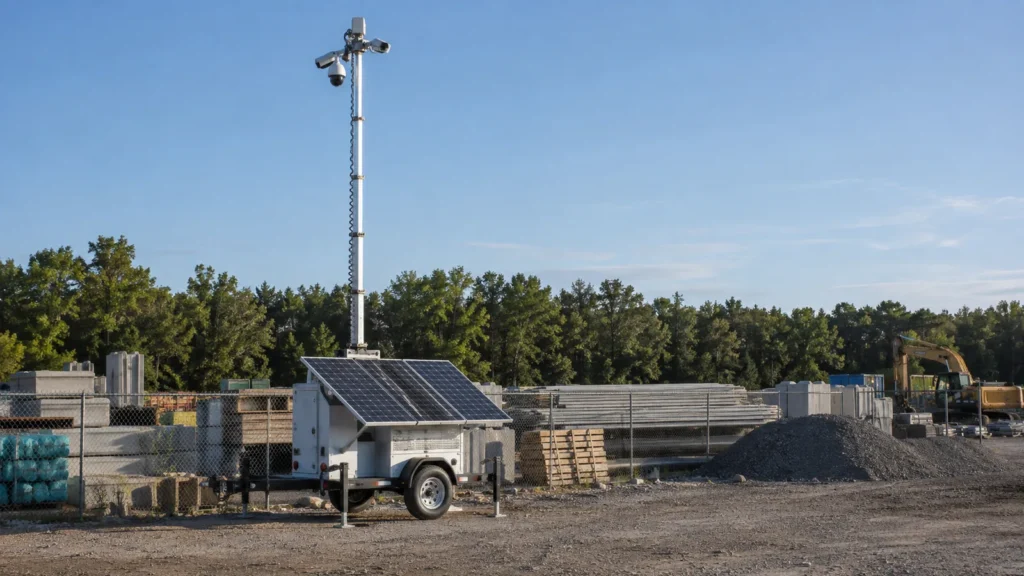
For this guide, a mobile surveillance unit means a trailer carrying elevated cameras, onboard power, communications and recording. If your request calls it a surveillance trailer, mobile security unit or camera tower on a trailer, specify those components explicitly so the supplier can confirm that you mean the same equipment.
In a purchasing request, define the complete package: trailer, camera configuration, power source, connection, recording and monitoring responsibility. Avoid leaving “unit” as an unexplained line item. Ask for the proposed camera views and a list of included services alongside the equipment description. That gives your operations team something concrete to review before delivery.
The specification checklist
Use these supplier questions to turn each decision into a written requirement for your site.
| Component | Options | What to decide | Question to ask the supplier |
|---|---|---|---|
| Mast | Short-to-medium, tall or telescoping configurations, depending on platform | Sightlines, placement, access and stabilization | Can you show the proposed views and confirm setup requirements for this position? |
| Cameras | PTZ, fixed, license-plate views, low-light / IR; thermal as an optional accessory | Which areas need an adjustable view, a fixed view or plate-focused coverage | Which camera serves each target, and which specialty options are compatible and included? |
| Power | Solar with batteries, shore power, or supported generator integration | Available power, sun exposure and backup arrangements | How will you size power for the complete proposed camera, lighting and communications package? |
| Connectivity | LTE / 5G cellular | Connection suitability at the actual trailer position | Will you demonstrate the connection here and explain what happens if it drops? |
| Recording and retention | Deployment-specific storage and access arrangements | Where footage resides, how long to keep it and who may retrieve it | Can you document storage, retention, permissions and the clip-export process? |
| Deterrence | Lighting, warning lights, loudspeakers and sirens | Desired intervention and who controls activation | Which lights and audio functions are included, and when will they activate? |
| Analytics | Motion, line-crossing and intrusion detection options | Activity, zones and hours that should trigger review | Can you demonstrate the alert rules against normal site activity? |
| Monitoring | Professional monitoring through a monitoring partner, or your own team | Who reviews alerts, intervenes and contacts site personnel | Who receives each event, during which hours, and what is the escalation process? |
Component options as described on Hawk Surveillance product pages, September 2026. Explore cameras, analytics and other add-ons.
Analytics gets its own row because alert rules deserve a separate discussion within camera configuration. Treat the table as a request template: have the supplier complete the answers, identify optional items and explain any unresolved site conditions. For license plates, ask whether the proposal includes plate-focused images, recognition software or both.
Match the unit to the site
Choose a starting configuration around the site’s space, terrain and available power. A tight parking area calls for different placement decisions than an exposed industrial yard. These configurations belong to Hawk’s Northern California rental fleet; use the table to begin the survey discussion, then confirm the actual package.
| Site situation | What usually matters | Which Hawk rental configuration fits |
|---|---|---|
| Tight urban lot or parking area | Compact footprint, short-to-medium mast height, entrance views and available shore power | Compact Urban Surveillance Trailer |
| Wide yard, long perimeter or exposed windy site | Tall mast, heavy-duty frame, stabilizers and power sized for the selected payload | Heavy-Duty Industrial Surveillance Trailer |
| No power on site | Sun exposure, solar charging, battery reserve and cellular connection | Solar Surveillance Trailer |
Source: Hawk Surveillance’s linked product pages, reviewed September 2026. Suggested starting configurations require site assessment.
Ask the surveyor to mark the proposed trailer position and camera targets on your site plan. Include delivery access and any planned changes to storage or traffic routes. For exposed sites, request the actual operating limits and stabilization instructions; a qualitative mast description is not a wind rating.
Power and connectivity: the two things that decide uptime
Specify power and connectivity together before approving placement. Solar needs suitable sun exposure and battery reserve, while a cellular connection needs checking where the trailer will actually stand. Ask for a plan that considers the complete equipment load, seasonal conditions and what the supplier will do if either resource becomes inadequate.
Solar production changes with weather, season and shading; batteries provide stored energy when sunshine is unavailable. Shorter winter days belong in that assessment. The Department of Energy explains these factors in its solar and storage guidance and solar radiation overview.
Where the site has a usable electrical supply, ask about shore power. If backup generation is proposed, confirm platform compatibility and responsibility for supporting it. Request a connection demonstration from the final position, including remote video and an alert test. Ask separately whether recording continues during a connection loss and how anyone learns that the unit is offline.
Recording, retention and who watches
Decide where footage will be stored, how long your organization needs it and who will respond to events. Treat recording and monitoring as separate requirements. Professional monitoring through our monitoring partner can provide live review and intervention; your specification should also identify who retrieves recordings and manages access.
Ask the supplier to document storage location, the agreed retention policy and how authorized staff save an incident clip. Request a demonstration of retrieval before accepting the setup. Do not assume a storage arrangement or retention period from the camera model alone.
For 24/7 remote video monitoring, agree on alert zones, monitoring hours, audio intervention and the contact order. If your own team will monitor, name the responsible people and ask the supplier to confirm integration with your video management system. Include a test event in the handover.
Rent or buy?
Renting suits a defined project in Northern California, with the planned end date and any expected moves included in the scope. Buying suits long-term or multi-site programs where ownership fits the operating plan, and Hawk sells Mobile Pro Systems trailers across the Western US.
How we spec a unit with you
We start with your site layout, the areas you need to see and the people who need to act on an alert. We walk the site, choose placement for sightlines and power, and configure cameras and monitoring around that plan. Bring access details and anticipated layout changes to the discussion.
For a standard rental from our Northern California fleet, we typically have the unit running within 24 to 48 hours in most cases. Units configured or built to a site’s requirements are scheduled at survey. Discuss mobile surveillance trailer rental in Northern California with your site location and required start date.
Frequently asked questions
A useful specification connects the equipment to your site’s daily operation. These answers cover the basic choices, but the written proposal should identify the selected hardware, power arrangement, recording policy and monitoring responsibility. Use any unanswered question as an item to resolve during the site survey and handover.
What is a mobile surveillance unit?
What cameras should a mobile surveillance unit have?
How is a mobile surveillance unit powered?
Does a mobile surveillance unit need Wi-Fi or an internet connection on site?
A cellular-equipped mobile surveillance unit does not require site Wi-Fi, but remote access still needs a working network connection. Hawk’s product pages describe LTE / 5G options. Ask for a demonstration at the intended trailer position, including video access and an alert test. Confirm what happens to recording during a connection loss, who receives an offline notification and how service is restored.
Who monitors the cameras on a mobile surveillance unit?
Should I rent or buy a mobile surveillance unit?
Need a unit specified for your site?
Send your site location, layout, target areas and required start date so we can discuss the specification with you. Call Hawk Surveillance at (530) 593-4295, email sales@hawksurveillancesystem.com or contact Hawk to start a site-specific conversation about equipment, recording, monitoring and the deployment plan.